












Open Golf - Play Best 3D Golf Sports Game Online
Play Open Golf online for free and take on a variety of challenging mini-golf courses. Master shot power, learn the physics, and aim for the lowest score across every hole.
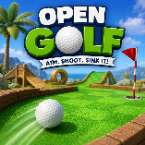
Open Golf is a simple yet surprisingly challenging mini-golf game that captures the classic feel of old-school browser sports games. Each course presents a different layout filled with slopes, angles, and obstacles that require more than just a powerful shot. Success comes from judging distance, controlling direction, and learning how the ball reacts to the terrain.
The game is easy to pick up, but getting a low score across every course takes patience and practice. Whether you're trying to beat your personal best or competing with friends for the top score, every hole offers a new challenge. Small mistakes can quickly add extra strokes, making careful planning just as important as accuracy.
With its clean 3D visuals and straightforward gameplay, Open Golf delivers a relaxing yet competitive experience that can be enjoyed in short sessions or longer score-chasing runs.
How to Play
Your objective is simple: get the golf ball into the hole using as few strokes as possible. Before every shot, you'll need to choose the right direction and power level. Some holes can be completed with a direct approach, while others require bank shots, precise angles, or careful positioning.
As you progress through the courses, you'll begin to understand how the game's physics work. Learning how much force to apply and how the ball rolls across different surfaces is the key to improving your score. Players who take time to study each hole often perform much better than those who rely on power alone.
Once you've completed the course, check your final score and see how it compares with friends or previous attempts.
Controls
Desktop
- Click and drag backward inside the aiming circle to set shot direction and power.
- Release the mouse button to hit the ball.
- Click and drag outside the aiming circle to rotate the camera and view the course from different angles.
Mobile & Tablet
- Drag backward on the aiming control to adjust power and aim.
- Release to take your shot.
- Swipe outside the control area to rotate the camera and inspect the course.
Platform
Open Golf can be played directly in your web browser with no download required.
Supported devices include:
- Desktop computers
- Android phones
- iPhone
- iPad
- Android tablets
- Other touchscreen mobile devices
The game is fully optimized for both mouse and touch controls, making it easy to play whether you're on a computer or a mobile device.