



























Tile Match – Play Online Triple Tile Puzzle Game
Play Tile Match online, match three identical tiles, clear the board, and plan your moves carefully to keep the collection tray from filling up.
Game Intro
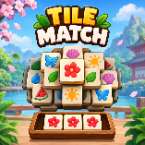
Tile Match is a tile-matching puzzle game where the goal is to find identical tiles, collect them in a tray, and clear the board. Each level presents a layout filled with tiles featuring different patterns. Your task is to spot matching designs and select the right tiles to make groups of three.
The rules are easy to understand, but clearing the board takes a little planning. Since selected tiles stay in the tray until you complete a set of three, every move affects how much space you have left. Picking tiles without checking what lies beneath them can quickly fill the tray and leave you with fewer options.
Tile Match combines the familiar idea of matching identical symbols with a simple tile-selection mechanic. It is a good choice for players who enjoy casual puzzle games that reward observation, patience, and careful decision-making. You can take your time studying the board, look for useful combinations, and work toward clearing all the tiles without running out of space.
How to Play Tile Match
When a level begins, you will see a board containing tiles with different patterns or designs. Your objective is to remove every tile by collecting three identical ones.
- Look over the board: Check the available tiles and identify patterns that appear more than once. Pay attention to which tiles are accessible and which may be covered by others.
- Select a tile: Tap or click a tile to move it into the collection tray at the bottom of the screen.
- Match three identical tiles: Collect three tiles with the same design to form a matching set. Once the set is complete, those tiles are removed from the tray.
- Keep clearing the board: Continue selecting tiles and completing sets of three until no tiles remain.
- Watch the tray space: Tiles that do not form a complete set remain in the tray. If the tray fills up before you can make another match, the level ends.
Controls
Tile Match uses simple controls that are easy to learn.
- Mouse: Click a tile to select it and move it into the tray.
- Touchscreen: Tap a tile to select it when playing on a compatible mobile device.
- Planning your moves: Check the tiles already in the tray before selecting another one. Try to complete existing pairs instead of collecting too many different designs at once.
The main challenge is deciding which tile to pick next. A tile may look useful on its own, but selecting it without a clear matching plan can take up space you need later.
Tips for Clearing the Board
- Focus on existing pairs: If two matching tiles are already in the tray, look for the third one before starting a new combination.
- Check the layout carefully: Some tiles may be hidden beneath others, so removing accessible tiles can reveal new options.
- Avoid random selections: Choosing tiles simply because they are available can leave the tray filled with unrelated designs.
- Think a few moves ahead: Consider which tiles you may need next and whether your current selection will leave enough room for them.
- Keep the tray in mind: Completing matches regularly helps free up space and reduces the risk of running out of moves.
What Makes Tile Match Challenging?
The difficulty comes from balancing tile selection with the limited tray space. You may spot several matching designs on the board, but you cannot always collect them in the order you want. Some useful tiles may be covered, while other selections can leave you waiting for a third matching piece.
This means that success depends on more than finding identical patterns. You also need to manage the tiles you have already collected and decide when it is worth making a temporary choice to uncover new possibilities. A little patience can make the difference between clearing a level and filling the tray too early.
Play Tile Match Online
If you enjoy matching games that combine straightforward rules with a bit of strategy, Tile Match is worth trying. Select tiles, complete groups of three, and clear the board while keeping an eye on the collection tray. Take a moment to consider each move, because the tiles you choose now can determine which options remain available later.
Can you clear the entire board without filling the tray?