
























Simon Says - Browser Version of the Classic Electronic Memory Game
Play Simon Says online, the classic memory game where you repeat increasingly long color sequences. Customize the number of buttons, themes, layout, and replay speed.
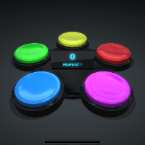
Simon Says is a browser version of the classic electronic memory game that first appeared in 1978. The idea is simple, but it becomes surprisingly challenging as the sequence grows longer. Colored buttons light up in a specific order, and your job is to repeat the pattern exactly as you saw and heard it.
This version adds several customization options that make the game more flexible than the original handheld toy. You can choose between 2 and 5 buttons, rotate the layout for a different visual setup, switch between multiple themes, and adjust the replay speed to match your skill level. Whether you want a relaxed memory exercise or a fast-paced challenge, the settings let you tailor the experience to your preference.
Simon Says is one of those timeless games that remains fun no matter your age. It is easy to understand within seconds, yet staying focused through long sequences can test your concentration and short-term memory.
How to Play
At the start of the game, Simon plays a short sequence by lighting up one or more colored buttons. Watch carefully and remember the exact order.
Once the demonstration ends, repeat the sequence by clicking or tapping the same buttons in the same order. If you enter the pattern correctly, Simon adds one more step to the sequence and plays it again. Each successful round makes the pattern longer and harder to remember.
The game continues until you make a mistake. Your final score depends on how many rounds you complete before missing a button. To improve, focus on both the colors and the rhythm of the sequence, especially when playing at higher speeds.
You can also experiment with the customization options to increase or reduce the difficulty. Using more buttons creates more possible combinations, while faster replay speeds leave less time to memorize each pattern.
Controls
- Mouse: Click the colored buttons to repeat the sequence.
- Touchscreen: Tap the buttons on phones and tablets.
Features
- Choose between 2 and 5 buttons
- Rotate the button layout
- Multiple visual themes
- Adjustable replay speed
- Works on desktop and mobile browsers